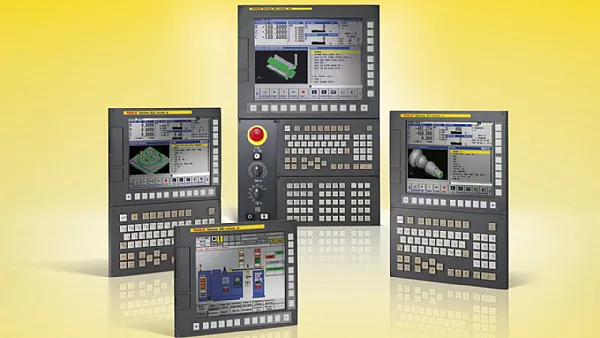
This content I try to use a more life-like, practical way, the appearance of the Fanuc control unit features, different series of screen differences, as well as these models in the end how to distinguish, all clear. We ourselves in Songwei this side every day in contact with Fanuc, Mitsubishi, Siemens, Okuma, Heidenhain's controller and servo system, these are our dismantling, maintenance, testing process of the real experience, but also more close to the situation you will encounter in the field.
Simply put, it is the whole machine tool for you to "see and touch” the piece: screen, buttons, emergency stop, start, USB slot, a variety of interfaces, all in this panel. In fact, there are CPU, system board, storage board, these "invisible but important” things, it is both the HMI, but also the core processing center of the whole set of CNC.
Machine tool bad or not, can power on, alarm can be found out, most of them rely on it.
Fanuc appearance in the end what are the characteristics?
You should have seen Fanuc's most classic color scheme: yellow back shell, black frame, with a row of ridiculously solid hard keys.Fanuc's design is not beautiful, but it is very "machine shop style”, oil resistance, shock resistance, knock resistance.
Whether it's an old CRT or a new LCD, it retains this industrial style. Over time, you see the yellow and black color scheme, you know "ah, this must be Fanuc”.
Screen orientation: landscape? Vertical screen? Different ages are obvious
When actually repairing, you can often guess the model number just by looking at the orientation of the photo.
- Horizontal screen (the "modern” one)
The 0i-MD, 0i-MF, 31i, 32i, 35i, etc. are basically horizontal screens. The advantage of the horizontal screen is that you can open multiple windows, the interface layout is more comfortable, 10.4 inches, 12 inches, 15 inches are available. Commonly used in machining centers, milling and turning, multi-axis machines.
- Vertical screen (the standard of the old generation of machines)
0i-MB, 16, 18, 21 These years a little earlier, more vertical screen, and the old models still use CRT, the late replacement for LCD. These machines itself is not a high number of axes, the structure of the simple, vertical screen, on the contrary, to save space, commonly found in the ordinary lathes, small milling machines.
A lot of machine tool manufacturers early models with these, so now you can still see a lot of the market in use.
Why are there so many models? What is the difference between the numbers?
Below I am not a textbook kind of way to talk, but according to our daily see the law to explain, so that you later see the model will be able to immediately determine which generation.
- 0 series (the most common, most widely used)
You must have seen 0-M, 0-T, and then later 0i-MB / 0i-MC / 0i-MD / 0i-MF.
A few key points:
* 0i = Fanuc's most versatile platform
* M = Milling machine, T = Turning machine
* B → C → D → F These letters are the generation of faster, larger storage, and more modern interfaces
As long as it is a general machining center or lathe, 80% of them are 0i series.
- 16 / 18 / 21 series (the "classic models” from the 90's to the 2000's)
These are the three brothers that you will see very often on the market.
* 16 = a little higher grade
* 18 = most used
* 21 = lite version
Most of them are vertical screens, CRT or early LCD, modular structure, easy to disassemble and repair (we do most of this kind of repair here). Many old machines are still in use and have a long life.
- 30i / 31i / 32i / 35i Series (High-end, fast, multi-axis)
This kind of system is basically a horizontal screen, the interface is wider, and it can run high-speed and high-precision, multi-axis, 5-axis linkage.
* 30i: high-end multi-axis, complex machine tools
* 31i: common in four-axis five-axis machining centers
* 32i: a little more economical
* 35i: do more punching, bending and forming machines
If you see machines with large gantries and complex linkages, they are basically these types of controllers.
How to quickly recognize a Fanuc controller?
If you only have a cell phone photo on site, you can probably judge it this way:
* Vertical screen + CRT or small size LCD → Mostly 16/18/21 or early 0 series
* Horizontal screen + wide interface → basically 0i-MD/MF or 30i/31i/32i
* Extraordinary number of hard buttons and compact layout → Mostly vertical screen series for traditional machines
* New machine tool + large screen → most likely 0i-MF or 31i
Combined with the label on the back and the model number beginning with A02B, you can confirm to which specific generation.
Why do you need to know this?
When we usually find replacements, do tests and repairs for customers, we often encounter:
* The screen is broken, but the model number and generation must be correct, otherwise it is not compatible.
* Some old systems are more cost-effective to repair than to replace; newer systems are the other way around.
* Some machine tool software can only run on certain generations (e.g., be careful about parameter migration when replacing a 0i-MC with a 0i-MF).
* You can tell how many axes it supports, whether it has Ethernet or USB by its series.
The more you know about these details, the lower the probability of buying the wrong parts or matching the wrong ones.
How can Songwei help?
We are dealing with Fanuc CPU, motherboard, screen, I/O, servo drive, servo amplifier, test bench, replacement parts, repair, change machine every day.
If your panel has a black screen, system crash, touch failure, CPU error, or you want to replace your 0i-MF panel and need to confirm whether it’s an 18i/21i/0i-MC model,
Songwei can help you quickly identify the unit, run tests, carry out repairs, and supply new or used parts.



